
Some of all us people on a pc might have some problems with the raw video form the Canon EOS 5D Mark II. This i due to quicktime not really supporting hardware on PC’s.
However you can download a small free program called vlc that with a small settings change will playback the video just fine. In general this is a player i will HIGHLY recommend. It plays just about everything and you don’t need to install loads of codec packs and stuff like that. Go to this page for a free download: https://www.videolan.org/vlc/
Out of the box this might not play videos from the 5D Mark II perfectly but a simple change can fix this.
Go to Tool > Preferences in the box that opens make sure you turn on all in the show settings box to the lower left.
Then go to Input/ Codecs > Other Codecs > FFmpeg. Find the setting called Skip the loop filter for H.264 decoding and set the option to all.
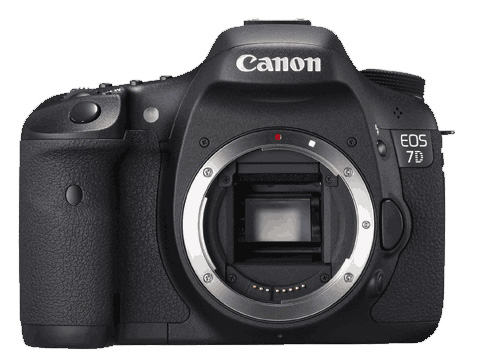
*** This trick should work just as well with video from the new Canon EOS 7D
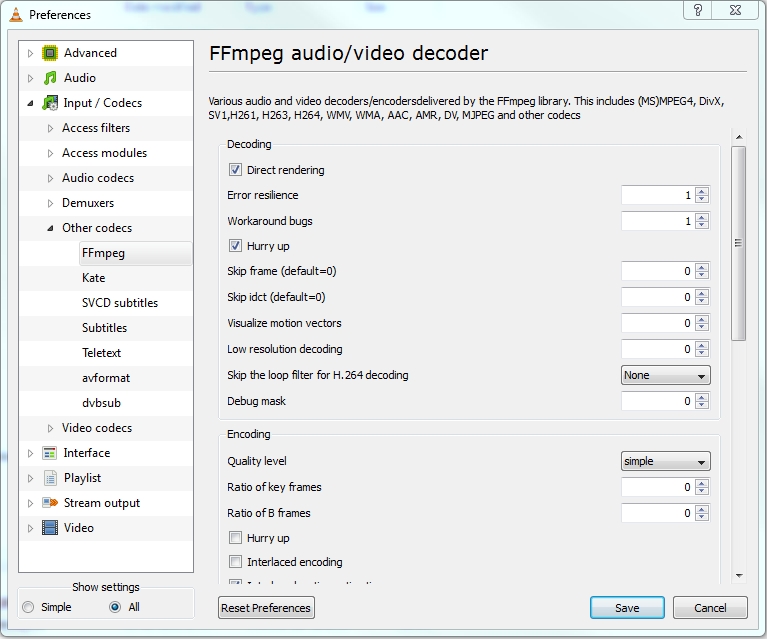
VLC Settings
This should fix your problems and VLC should now playback the 5D Mark II video with no problems.
Big thanks for the advice, now it works perfectly!
Hmmm… had my hope up but changing that doesn’t help for me. Still can’t get 5DmkII HD video to play back without lots of stuttering. This on Dell D830 2.2Ghz laptop with Nvidia NVS 135M graphics card. Any other ideas?
Sry I really don’t have any other ideas mayby the computer just is to slow. Footage like this
does take a bit of power to playback since it’s a lot of data.
Not sure why it didn’t work earlier… but now VLC is playing them 100% smoothly. Perhaps I needed to restart it or something. Thanks for the great tip!
A restart is often a good idea 🙂 Glad that you got it running 🙂
Thank you so much for this, I thought I was having a card speed issue, even though I didn’t get the 4 buffer bars on my screen during video rec. after using vlc with the tweak you suggest my videos play and look great!! Stupid quicktime, i’ve never liked it anyway 🙂
Your welcome 🙂 Glad I could help
excellent – just what i needed to know – thank you.
[…] to this post on the Photography Within blog, I’ve now found a trick that enables VLC to play these files very smoothly – you just have to […]
Play perfect now. But appear compression artefacts. Anyway – not bad.
Not working with my MAC power PC with 10.4 It would open the screen but then I adjusted to codecs as requested and now the Mac hangs and I have to force quit. Help please.
On a mac you should not have to deal with these problems they should play them native without any problems. Try just playing it back with quicktime.
mm. interesting 🙂
This is absolutely brilliant! Kind of strange that you need to set some obscure option to get smooth video playback in VLC (QT will *never* be installed on any of my PCs)…but now it looks good!
Thanks!!
totally works! thanks!
Makes you wonder why Canon didnt make the video format something that was compatible straight out of the box, or at least given us the choice of video format. Seems silly really to restrict us, but maybe its my lack of understanding.
Great post! I’ll subscribe right now wth my feedreader software!
Works exactly as described by you (both the video and the audio) using recent eos 5d mark II HD recordings.
Thanks very much indeed.
Worked perfectly on my previously stuttering 7D video shot in 25, 24, 60 1080 and 7620. Worked after a few minutes (no restart) on my dell laptop at work.
C2 duo 2.2G, 2GB RAM, Intel 965 GPU.
I tried current version of QuickTime 7.6.4 however this did not work.
Thanks!!
worked OK for me
thanks for the tip
RB
[…] CF card and then reformatted the card as suggested. Still had dropped frames. Then I found a post recommending the use of the VLC media player, a free program, for viewing the video from 5D Mark II […]
[…] playback looked fine on the camera, so the problem had(?) to be on the computer. Then I found a post recommending the use of the VLC media player, a free program, for viewing the video from 5D Mark II […]
Many thanks for this advice !
Now playing my video on pc which I thought was not possible ! Works great.
Thanks. I was having a problem with jumpy jerky video playback from my Canon 7d using Quicktime on several different PCs I tried. When I heard about VLC mediat player and tried it I still had the problem – until I found your note about changing the loop filter playback for for H.264 decoding. Everything now looks as good as I would have hoped.
I realized, however, that this points out how little I understand about the video issues involved in making this work. Can you recommend a source that would better explain some of the issues involved?
-db-
A related question – is there a way that the file can be converted to something that is likely to play well on a PC without having the recipient install another program?
-db-
@David good that it is working for you 🙂
If you want to learn more about dslr and video try going here: http://www.cinema5d.com/index.php
Loads of info and help.
You can convert the video so it will playback nicely but do some reading on it since you can end up with very big files or loss of quality.
Again the cinema5d forum should be a very good resource for this.
//theis
Thank You very much for this, didn’t work when i first tried it with vlc but after i changed my power settings on the computer it worked perfectly! 🙂